How to Use QuickSwap Exchange

Table of Contents
QuickSwap is a decentralized exchange (DEX) built on the Polygon blockchain, and many beginners want to understand how to use the platform for token swaps, liquidity provision, and other decentralized finance (DeFi) activities. Unlike centralized exchanges, QuickSwap allows users to trade directly from their own crypto wallets without relying on a third party to hold their funds. This article is for informational purposes and does not constitute financial advice. Before interacting with DeFi platforms, always Do Your Own Research (DYOR) and understand the risks involved.
For more insights and updates on the latest cryptocurrency trends, be sure to check out our Nifty Finances platform, your gateway to smarter financial decisions in the digital economy.
What Is QuickSwap?
QuickSwap is a Polygon-based decentralized exchange that enables peer-to-peer token trading using automated market maker (AMM) technology. Rather than matching buyers and sellers through a traditional order book, QuickSwap uses liquidity pools funded by users.
Within decentralized finance, QuickSwap helps users:
- Swap cryptocurrencies
- Provide liquidity to token pools
- Participate in yield farming or reward programs
- Access DeFi services without centralized intermediaries
Because QuickSwap is decentralized, users maintain control of their private keys and wallet assets during transactions.
This self-custody model gives users more control but also places greater responsibility on them for wallet security.
How to Use QuickSwap Exchange
Using QuickSwap generally involves setting up a compatible wallet, funding it with supported tokens, connecting to the platform, and using features such as token swaps or liquidity pools.
QuickSwap operates through smart contracts on the Polygon network, allowing users to exchange tokens with relatively low transaction fees compared with the Ethereum mainnet.
Before getting started, users should understand wallet security, transaction fees, and the risks associated with smart contracts and token volatility.
Set Up a Compatible Wallet
To use QuickSwap, users need a Web3 wallet compatible with the Polygon blockchain.
Popular wallet options include MetaMask and other Polygon-supported wallets. Hardware wallets may also be used for additional security.
Setting up a wallet usually involves:
- Installing wallet software or hardware
- Creating a wallet address
- Saving the recovery phrase securely
- Enabling additional security protections
Recovery phrases and private keys should be stored offline and never shared. Anyone with access to them can control wallet funds.
Users should also ensure the Polygon network is added to their wallet before using QuickSwap.
Fund Your Wallet With Supported Tokens
Before trading, users need funds in their wallet.
Common assets used on QuickSwap include MATIC, stablecoins, and other Polygon-based tokens.
Users typically fund wallets by:
- Buying crypto from an exchange such as Coinbase or Binance
- Withdrawing tokens directly to Polygon
- Bridging assets from another blockchain
MATIC is especially important because it is used to pay Polygon gas fees. Without enough MATIC, users cannot complete transactions.
Keeping a small MATIC balance for future transactions is recommended.
Connect Your Wallet to QuickSwap
Once funded, users can connect their wallet to QuickSwap.
The general process includes:
- Visit the official QuickSwap website
- Verify the website URL carefully
- Click Connect Wallet
- Select your wallet provider
- Approve the connection request
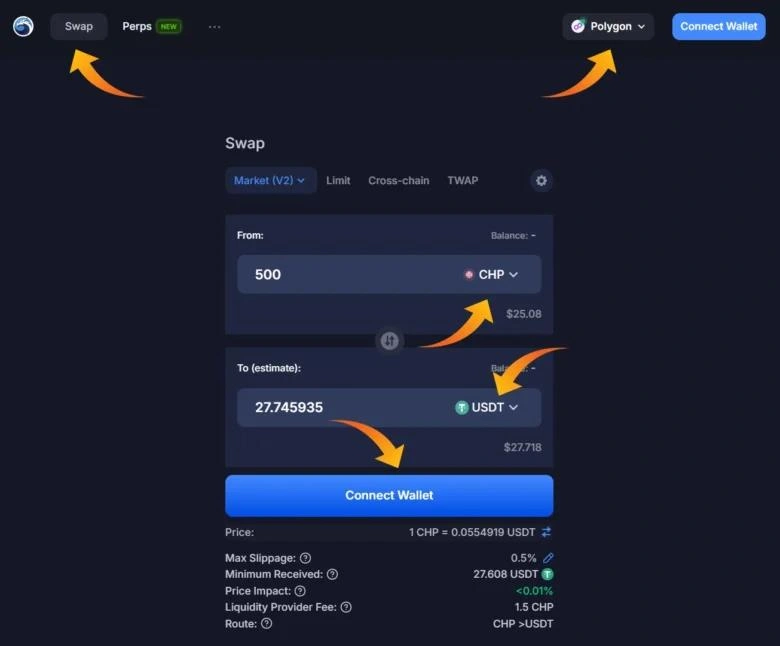
Always verify the URL before connecting a wallet, as phishing sites can imitate popular DeFi platforms.
Swap Tokens on QuickSwap
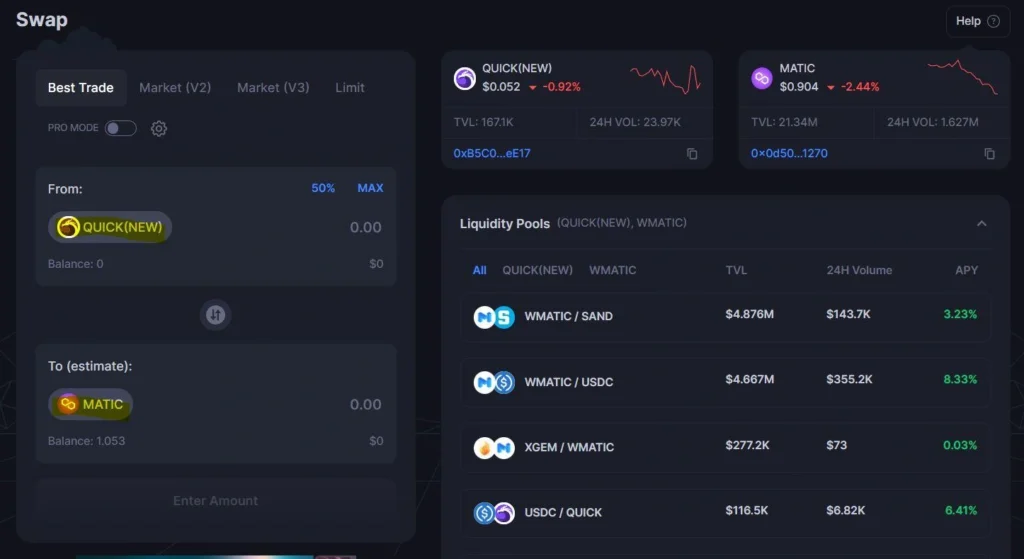
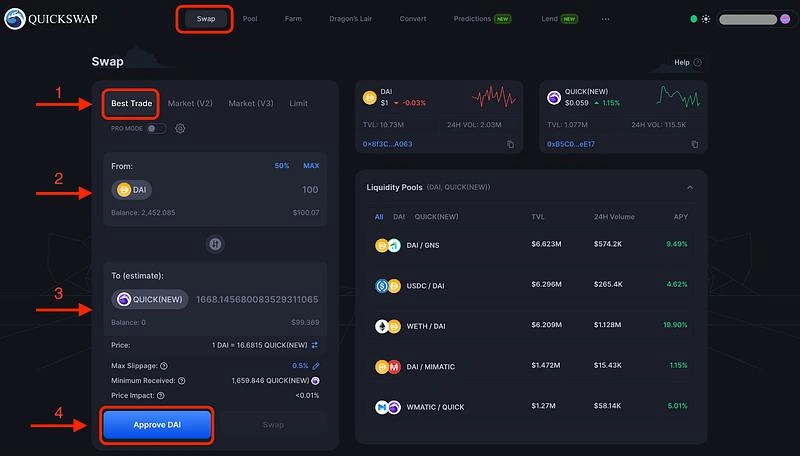
Token swaps are one of QuickSwap’s most commonly used features.
To swap tokens:
- Select the token you want to trade
- Choose the token you want to receive
- Enter the amount
- Review exchange rates
- Check slippage tolerance
- Confirm the transaction
Slippage refers to the difference between the expected trade price and the final execution price. Higher slippage may occur when liquidity is low, or markets move quickly.
After confirming, the wallet prompts users to approve the blockchain transaction.
Provide Liquidity and Earn Fees
QuickSwap also allows users to provide liquidity to trading pools.
Liquidity providers deposit pairs of tokens into pools, enabling swaps for other users. In return, they may earn a portion of trading fees generated by that pool.
The general process involves:
- Selecting a liquidity pool
- Depositing both required tokens
- Confirming the transaction
- Receiving liquidity provider (LP) tokens
Providing liquidity carries risks, especially impermanent loss, which occurs when token prices change relative to one another.
Users should understand these risks before participating.
Using QuickSwap involves setting up a Polygon-compatible wallet, funding it with supported tokens, connecting to the platform, and using features such as token swaps or liquidity pools. While the platform offers flexible DeFi tools, users should understand gas fees, smart contract risks, and liquidity-related risks before participating.
Before using QuickSwap or any DeFi protocol, research independently, verify token contracts carefully, and understand the risks involved. As always, Do Your Own Research (DYOR).
[…] is a decentralized exchange (DEX) built on the Polygon blockchain, and many users want to understand how to withdraw funds from […]
[…] is a decentralized exchange (DEX) built on the Polygon blockchain that allows users to supply token pairs into liquidity pools. These pools help power token swaps […]