How to Withdraw from QuickSwap

Table of Contents
QuickSwap is a decentralized exchange (DEX) built on the Polygon blockchain, and many users want to understand how to withdraw funds from the platform safely. Depending on how the platform is being used, withdrawing may involve removing liquidity from a pool, claiming farming rewards, or transferring tokens from a connected wallet to another wallet or exchange. This article is for informational purposes and does not constitute financial advice. Before interacting with decentralized finance (DeFi) platforms, always Do Your Own Research (DYOR) and understand the risks involved.
For more insights and updates on the latest cryptocurrency trends, be sure to check out our Nifty Finances platform, your gateway to smarter financial decisions in the digital economy.
What Is QuickSwap?
QuickSwap is a decentralized exchange operating on the Polygon network. It allows users to trade cryptocurrencies directly from self-custody wallets without relying on a centralized intermediary.
Like many DEXs, QuickSwap uses automated market maker (AMM) technology. Instead of matching buyers and sellers through traditional order books, AMMs rely on liquidity pools funded by users called liquidity providers.
QuickSwap supports activities such as:
- Token swaps
- Liquidity provision
- Yield farming
- Reward incentives
Users interact with the platform through Web3 wallets, maintaining control of their private keys throughout the process.
How to Withdraw from QuickSwap
Withdrawing from QuickSwap generally involves connecting a compatible wallet, locating the assets or positions you want to withdraw, approving the transaction, and confirming it on the Polygon blockchain.
The exact steps depend on how you are using QuickSwap. Some users simply swap tokens and later send them elsewhere, while others participate in liquidity pools or yield farming strategies that require additional withdrawal steps.
Before withdrawing, users should understand the type of assets they hold, the associated fees, and whether cross-chain transfers are needed.
Understand What “Withdraw” Means on QuickSwap
The term “withdraw” can mean different things depending on how you use QuickSwap.
Common withdrawal scenarios include:
- Removing liquidity from pools
- Claiming farming or staking rewards
- Sending tokens out of your wallet
If you are a liquidity provider, withdrawing means redeeming your liquidity pool position for the underlying tokens you originally deposited, adjusted for pool activity.
If you participate in reward programs, withdrawing may involve claiming accumulated rewards such as MATIC or other incentive tokens.
Understanding which type of withdrawal applies to your situation helps avoid confusion during the process.
Connect Your Wallet to QuickSwap
To begin, users need to connect a compatible wallet to QuickSwap.
Common wallet options include MetaMask and other wallets supporting Polygon.
The typical process is:
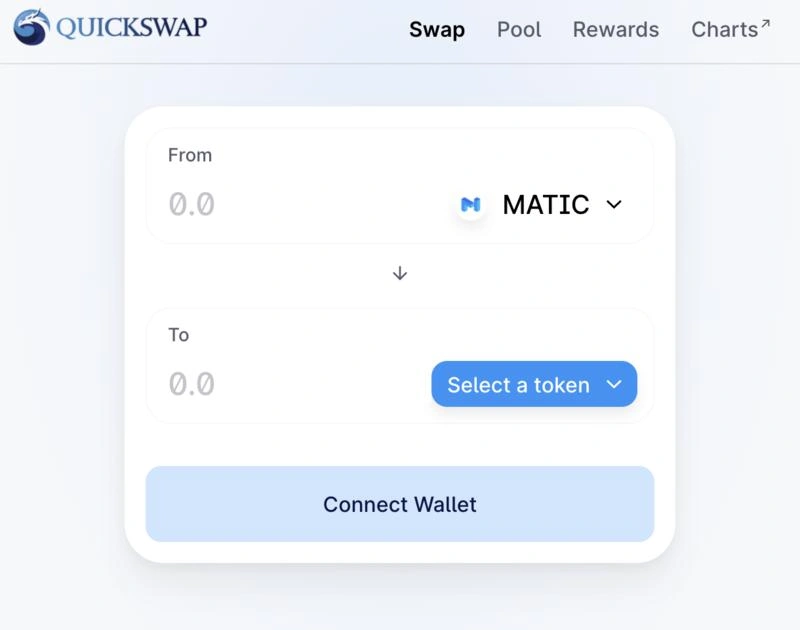
- Visit the official QuickSwap website
- Click Connect Wallet
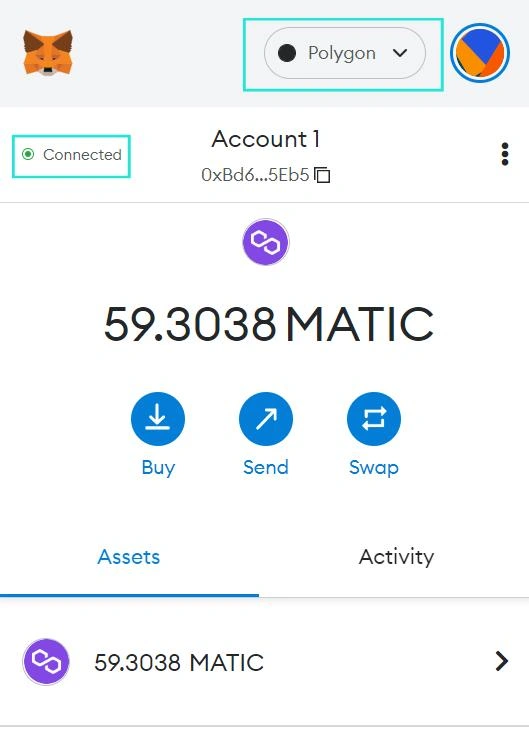
- Select your wallet provider
- Approve the wallet connection
- Confirm you are connected to Polygon
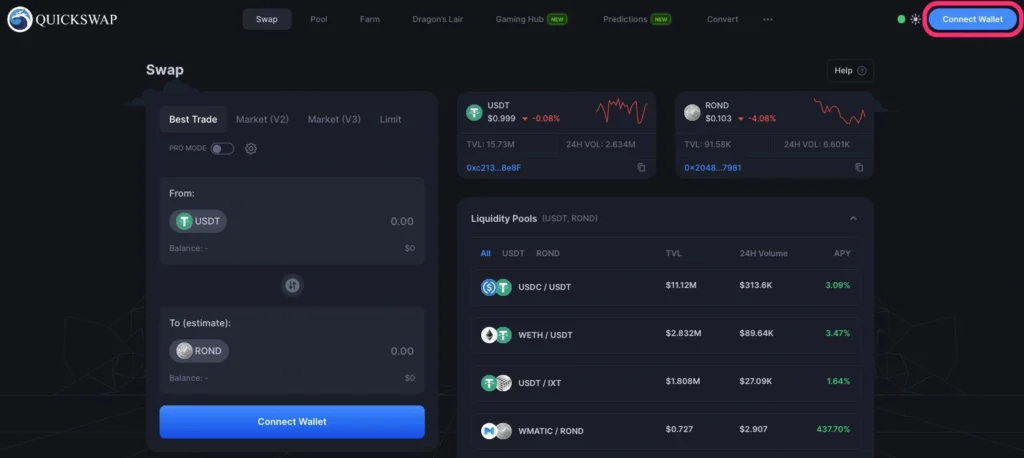
Users should always verify the website URL carefully to avoid phishing websites.
Remove Liquidity or Claim Rewards
If your funds are locked in liquidity pools or farming programs, you need to withdraw them through the relevant section.
The typical steps include:
- Navigate to the Liquidity or Farms section
- Locate your active position
- Select Remove Liquidity or Claim Rewards
- Review token amounts and rewards
- Confirm the blockchain transaction
When removing liquidity, the platform shows the amount of each token you will receive based on your share of the pool.
Users should also be aware of impermanent loss, which can affect the value of withdrawn assets relative to simply holding the tokens.
Transfer Funds to Another Wallet or Exchange
Once tokens are available in your wallet, they can be transferred elsewhere.
Common destinations include:
Before transferring, confirm the receiving platform supports the same blockchain network. Some exchanges support Polygon deposits for certain assets, while others may only support Ethereum mainnet or another network.
Sending tokens to an unsupported network may result in lost funds.
Fees and Transaction Costs
QuickSwap withdrawals can involve several costs.
Common fees include:
- Polygon gas fees for blockchain transactions
- Swap fees if exchanging tokens
- Slippage costs during trades
- Bridge fees for cross-chain transfers
Polygon gas fees are generally lower than Ethereum mainnet fees, but users still need some MATIC in their wallet to pay for transactions.
If bridging assets to another blockchain, additional time and fees may apply.
Withdrawing from QuickSwap typically involves connecting a wallet, removing liquidity or claiming rewards if needed, and transferring tokens to another wallet or exchange. While the process is often straightforward, users should carefully verify wallet addresses, supported networks, and transaction details before confirming any transfer.
Before moving funds, always check protocol documentation, confirm blockchain compatibility, and understand transaction costs. As always, Do Your Own Research (DYOR) before interacting with DeFi platforms or transferring digital assets.